3
Low Frequency Conguration
Low Frequency Tone - The Low Frequency feature will only operate when the primary siren system is generating a tone. When there is a signal
from a primary siren and the Low Frequency input is activated, the Banshee can generate one of three Low Frequency tones. The Low Frequency
input can be activated with a momentary switch and the Banshee will generate the Low Frequency tone for 7.5 to 60 seconds based on the Time-Out
conguration settings (see Low Frequency Time-Out).
The available tones are:
- Synchronized 1/2 Frequency (generates a synchronized tone at 1/2 the frequency of the primary siren tone).
- Low Frequency Yelp (generates an unsynchronized Low Frequency Yelp).
- Low Frequency Wail (generates an unsynchronized Low Frequency Wail).
Note: see Specications for details of each tone.
The Low Frequency input can also be congured to generate the CommandAlert tone. This tone will operate as long as the Low Frequency input is
active and there is a signal from the primary siren. When congured for the CommandAlert tone, the Low Frequency Time-Out is disabled.
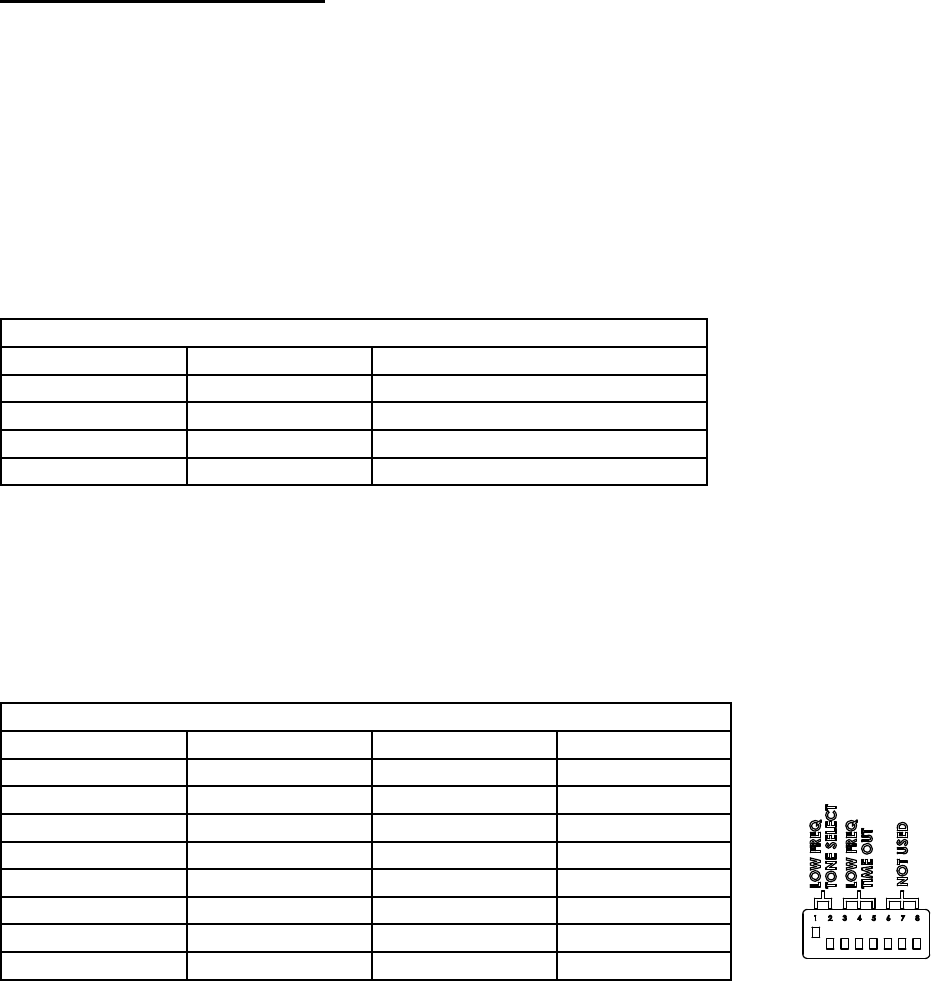
To congure the Low Frequency tone set the DIP switches according to Table 1 (reference Figure 1).
Table 1: Low Frequency Tone Conguration
Switch Position 1 Switch Position 2 Conguration
Down Down Synchronized 1/2 Frequency
Up Down *Low Frequency Yelp
Down Up Low Frequency Wail
Up Up CommandAlert (overrides Time-Out)
*Factory Default Setting.
Low Frequency Time-Out - A momentary switch, such as the vehicle horn ring, can be used to activate the Low Frequency tone. The Low
Frequency Time-Out can be congured to operate from 7.5 to 60 seconds. If the Low Frequency input is activated by a toggle On/Off switch the
Time-Out feature will shut off the Low Frequency tone after the congured time has expired. The Low Frequency input will have to be turned off
before it can be activated again. If the Low Frequency tone is congured for CommandAlert, then the Time-Out feature will be disabled. The
CommandAlert tone will be generated as long as there is a signal from the primary siren and the Low Frequency input is activated.
To congure the Low Frequency Time-Out set the DIP switches according to Table 2 (reference Figure 1).
Table 2: Low Frequency Time-Out Conguration
Switch Position 3 Switch Position 4 Switch Position 5 Conguration
Down Down Down *7.5 Seconds
Up Down Down 15 Seconds
Down Up Down 22.5 Seconds
Up Up Down 30 Seconds
Down Down Up 37.5 Seconds
Up Down Up 45 Seconds
Down Up Up 52.5 Seconds
Up Up Up 60 Seconds
*Factory Default Setting.
Figure 1

 (12 Seiten)
 Manymanuals.com
 Manymanuals.de
 Manymanuals.fr
 Manymanuals.it
 Manymanuals.pl
 Manymanuals.cz
 Manymanuals.es
 Manymanuals-pt.com
Kommentare zu diesen Handbüchern