9
Setting Flash Patterns
Step 1
Power-up the light bar by connecting the Red wire to +12V and the Black wire to ground, and select Level 1 on a user-purchased 3
Level controller or, if the Lightbar is not yet connected to a controller, energize Level-1 by connecting the Blue wire to +12V.
Step 2
Observe the ash pattern operation and determine which pattern is in operation for Level-1. Refer to Table 2. Note: the Factory
Default is different for each ash pattern Level. Once the ash pattern has been determined, proceed to Step 3.
Step 3
Apply +12V to the Green wire momentarily to scroll to the next ash pattern, then release the Green wire from +12V. Continue to
repeat these steps until the desired ash pattern is reached. The pattern is automatically stored for Level 1. Repeat this procedure
for Level 2 and Level 3, or any other desired combinations of wire colors.
Default Pattern Selection
To reset the ash patterns to the factory default, activate the Lightbar in the desired Level, or combination of colors, and then hold the
Green wire to +12V for approximately 4 seconds.
Dimming Operation - 21TR™
The 21TR™ features a low power "Dimming" mode. Dimming is controlled by connecting the White wire to +12V. When Dimming is
engaged, the light heads will operate in a reduced power mode. For safety purposes, the corner modules in lightbars are not con-
nected to the dimming circuit. This ensures that when corner modules are turned on, full 360 degree coverage and compliance
with SAE warning light standards is provided.
The Dim setting reduces the light output of emergency warning lights reducing the effectiveness of
them especially in brightly lit areas. Failure to use adequate light for the circumstances can cause
motorists to fail to see the emergency vehicle and lead to serious personal injury or death. Never
use the DIM setting in a brightly lit area. Use of the DIM setting may cause emergency lights to not
comply with applicable emergency warning light standards. Use caution when using the DIM setting
to assure that motorists can clearly see the emergency vehicle.
WARNING!
!
Steady Burn Setting - 21TR
TM
The Steady Burn feature allows one output from the Lightbars central controller to operate in Steady Burn mode. Any lightheads con-
nected to the #2 output (the blue/black colored wire) will operate in Steady Burn mode assuming the Steady Burn feature is enabled
as described below. The default setting from the factory is Flashing mode, not steady burn mode.
Steady Burn is enabled by a user-supplied 3 Level controller. The light bar is congured so that Steady Burn Light head(s) are on when
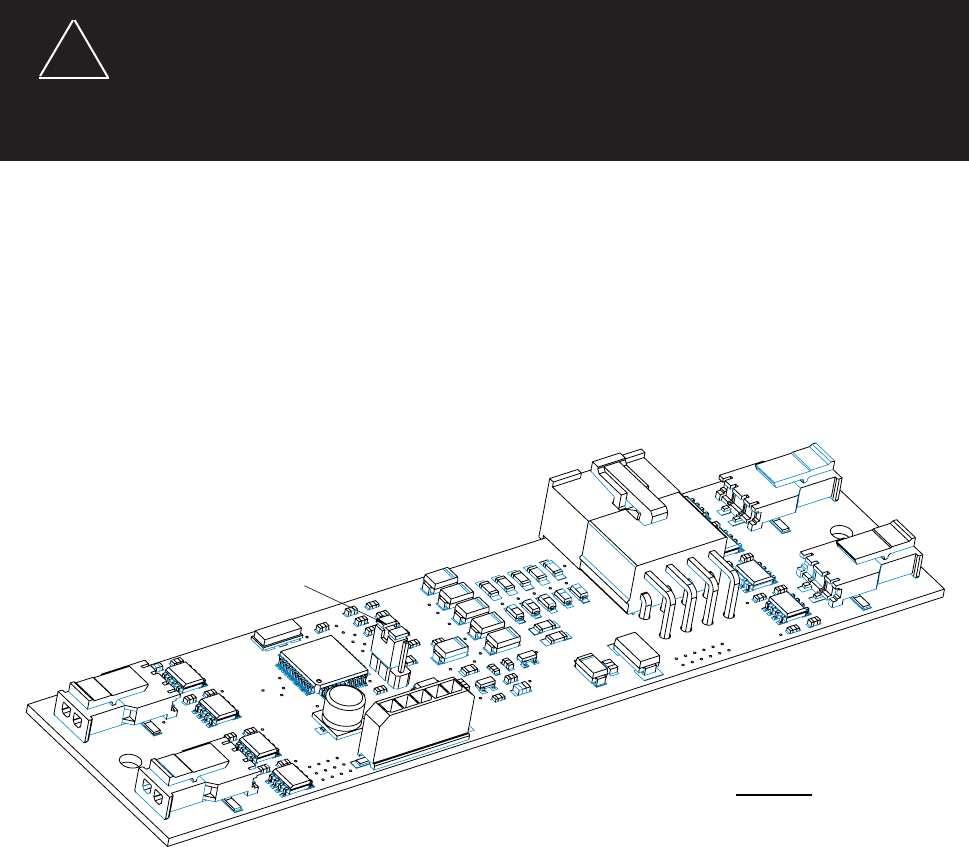
either Level 1, Level 2 or Level 3 are energized. Simply move the jumper to the non-default position. Refer to the detail in Figure 5.
Jumper - Shown in Default Position
Move jumper to next position for
Steady Burn light head operation
Jumper Position:
Default: Light head(s) connected to Blue/Black wire will operate in flashing mode.
Steady-Burn: Light heads(s) connected to Blue/Black wire will operate in steady-burn mode.
FIGURE 5

 (5 Seiten)
 Manymanuals.com
 Manymanuals.de
 Manymanuals.fr
 Manymanuals.it
 Manymanuals.pl
 Manymanuals.cz
 Manymanuals.es
 Manymanuals-pt.com
Kommentare zu diesen Handbüchern